START HERE
For your first PC bang in Seoul, ask for a non-member session, check the time and price, and follow the café’s instructions to get a seat. At the prepaid café in my video, I bought time at a kiosk and used the printed number to log in. That number starts your PC session; it does not give you a game account. Check your chosen game before paying, or keep the visit simple with food and something to watch.
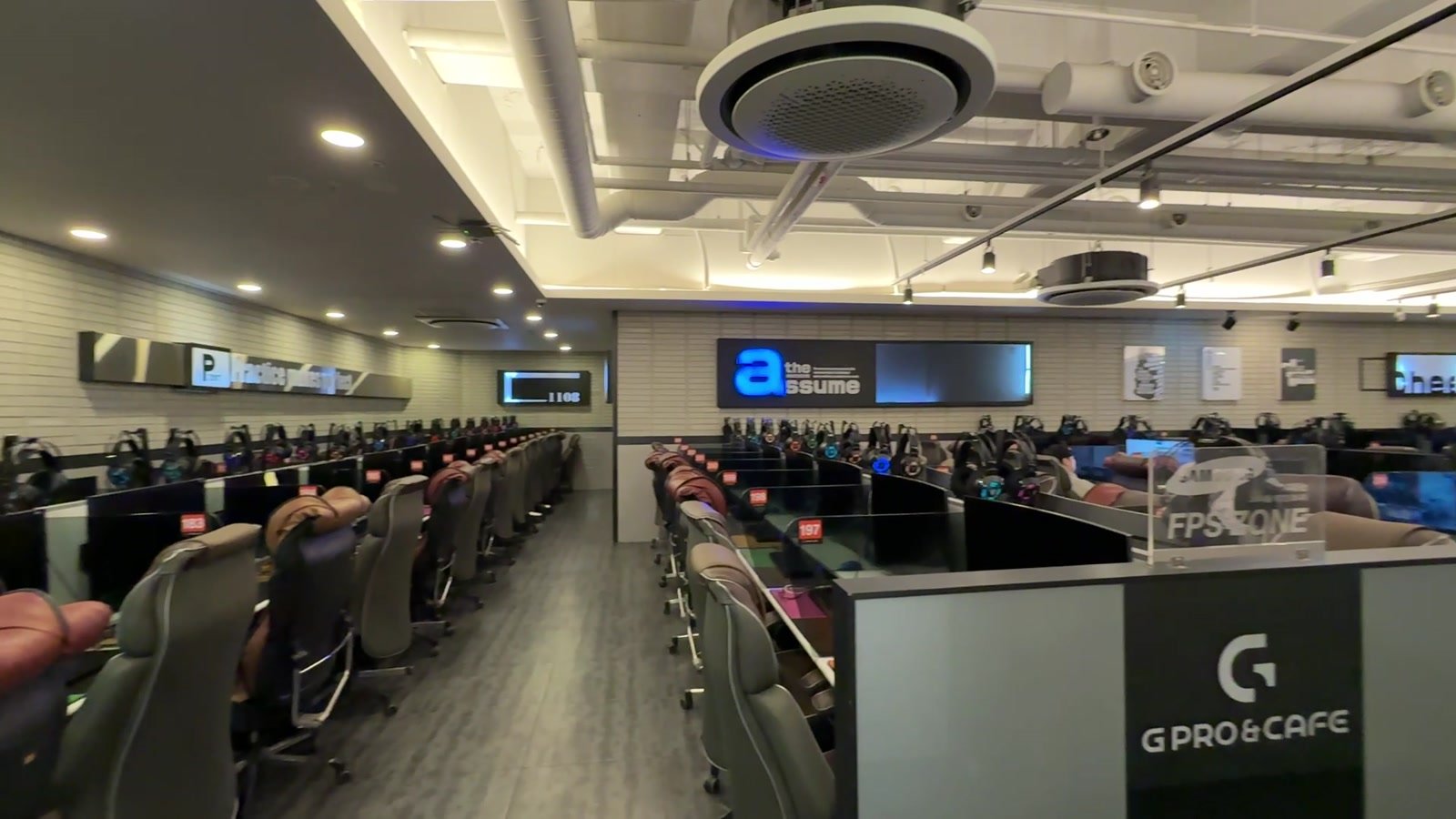
A PC bang (PC방) is a Korean internet café focused on gaming, where you pay to use a computer. The appeal is the whole setup: a gaming chair, keyboard, headset and, at the café I visited, a food menu you can order from without leaving your seat.
For a first visit, I suggest starting with an hour and one dish. That gives you a simple way to try the setup without committing your afternoon. If you are going for a particular game, check that your account works before buying time.
PC bang culture with BaeTrip Korea.
In this guide
Can foreigners use a PC bang in Seoul?
Yes—look for a café that offers non-member access. Look for 비회원, meaning “non-member,” or show the first phrase below to the counter staff. The café in my video offered this route, so I could buy a temporary session rather than register as a member.
If the screen asks for a Korean phone number, ask staff for guest access before filling in a membership form. Each café sets its own registration requirements, so begin at the counter if you are unsure.
Can you just browse, work or print?
You can make the visit about browsing and food rather than gaming. If you need to print a boarding pass or use a particular work application, check that service before buying computer time. Ask about the printer location and any separate charge. For a video call or quiet work, check the room’s noise level before settling in.
Check these four things at the counter
- Your plan: “Can I use this as a non-member?” If you have a specific game in mind, show its name and explain which account region you use.
- The total: confirm how many minutes the non-member price buys, whether your chosen seat or game costs extra, and whether food is separate.
- Payment: ask whether your card is accepted. Bring some Korean won as a backup; a card logo or Korean mobile-payment button does not guarantee your overseas card or wallet will work.
- Your group: ask for adjacent seats before paying. If someone only wants to watch, confirm whether they need a paid seat too. Families should also ask about age checks and permitted visiting hours.
Search your map app for PC방 or 피시방 near the area you are already visiting. Check the particular branch’s opening hours. For a first visit, choose somewhere with an available staff member who can help with the kiosk.
1. Buy time and choose a seat
At the café I visited, the entrance kiosk sold prepaid time. Its 비회원요금 tab showed the non-member options. I selected a package, paid, and collected a printed ticket with a login number.
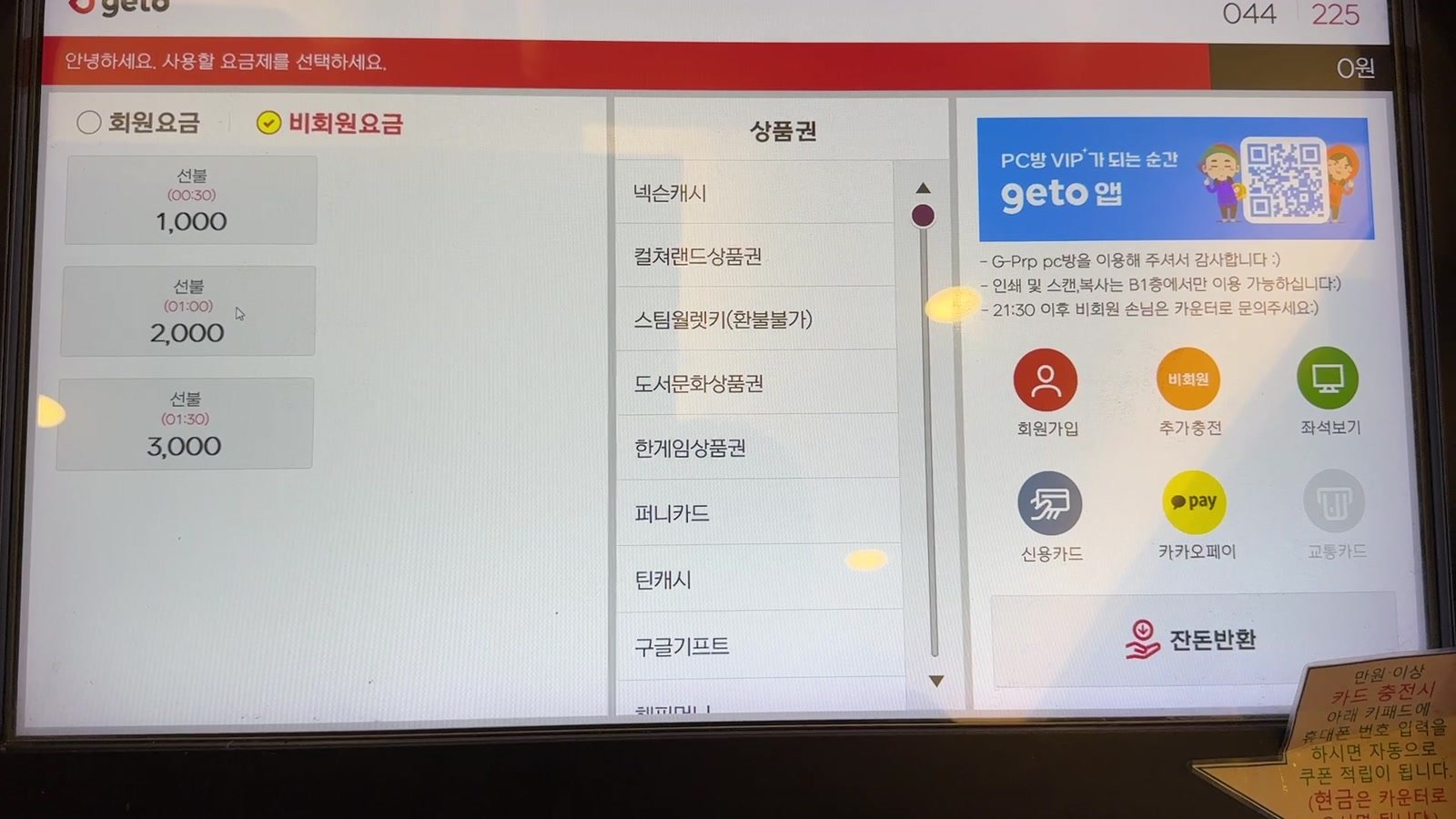
How much does it cost? In my 2025 visit, the non-member packages were ₩1,000 for 30 minutes, ₩2,000 for one hour and ₩3,000 for 90 minutes. Use your café’s current non-member rate to budget, and allow extra for food. Read the minutes beside the price: member packages may offer different value.
- Choose the non-member option or ask the counter to set up a guest session.
- Confirm the package duration and payment method before paying.
- Collect your ticket or the login details staff provide. Keep them until you leave.
- Check the available-seat display or ask staff which seat to use.
Follow the order on that café’s screen. Some systems ask you to choose a seat during purchase; I used my ticket number at the computer. Do not assume every empty chair is available, or that the number on a login ticket is your seat number.
If payment does not complete: ask staff to check whether a ticket or credit was issued before trying again. Show the kiosk message, then ask about paying at the counter or using cash.
2. Log in to the café, then to your game
At your assigned or confirmed seat, wake the computer if necessary. In my visit, the screen had a 비회원 로그인 (non-member login) tab and a field for the ticket number. Enter the number exactly as printed. If it fails, show the ticket to staff before buying another session.
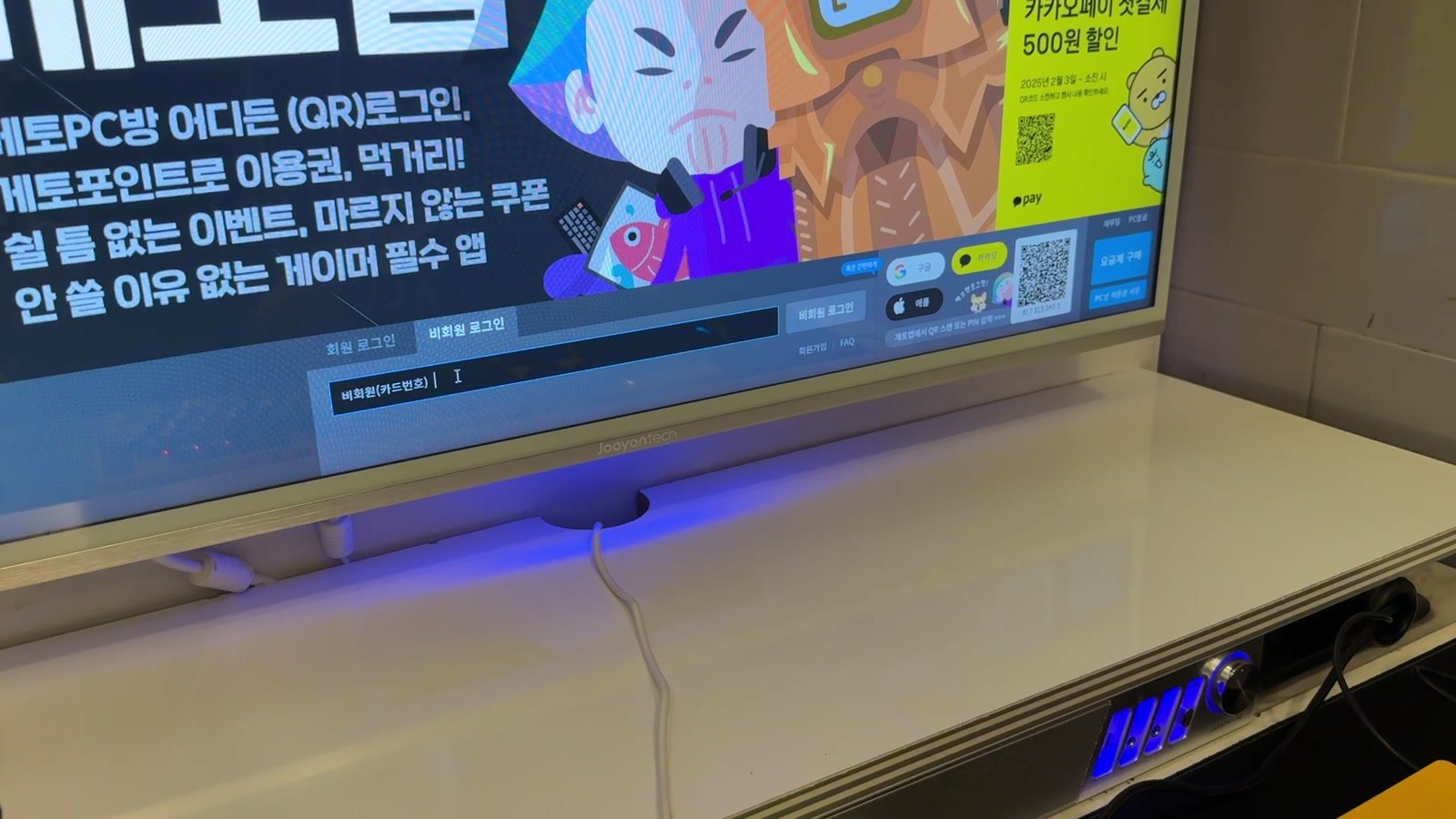
Before opening a game, test the mouse and headset and adjust your chair. If typing produces Korean characters when you need English, ask staff to switch the input language. Have them check equipment problems before you move to another seat.
PC bang login
Controls your paid computer session and remaining time. The café supplies the guest number or explains its membership system.
Game login
Controls access to an individual game or service. Its publisher sets account, region, licence and identity requirements.
A desktop full of game icons does not mean every game is ready for your account. For example, Riot explains that League of Legends accounts are tied to regions. Paying for a Korean PC bang session does not change your account’s region.
What can you do without a Korean game account?
- Use your own supported account. Ask whether the installed client can run the game and region you already use. Have access to your own two-factor authentication before you arrive.
- Ask about Steam. At cafés participating in the Steam PC Café Program, customers use personal Steam accounts and may access games licensed by that café. Ask which titles are included and ready to play at that café.
- Make it a food-and-screen break. Browse the web or watch videos. For subscription streaming, bring your own account and sign out when you finish.
Check installation as well as your account. Ask whether the game needs a download or update and whether that waiting time uses your paid credit. A short visit is easier when your chosen game is already ready to run.
If a game requires identity verification you cannot complete, use the publisher’s official support or choose another activity. Keep to your own accounts.
3. Order food from your seat
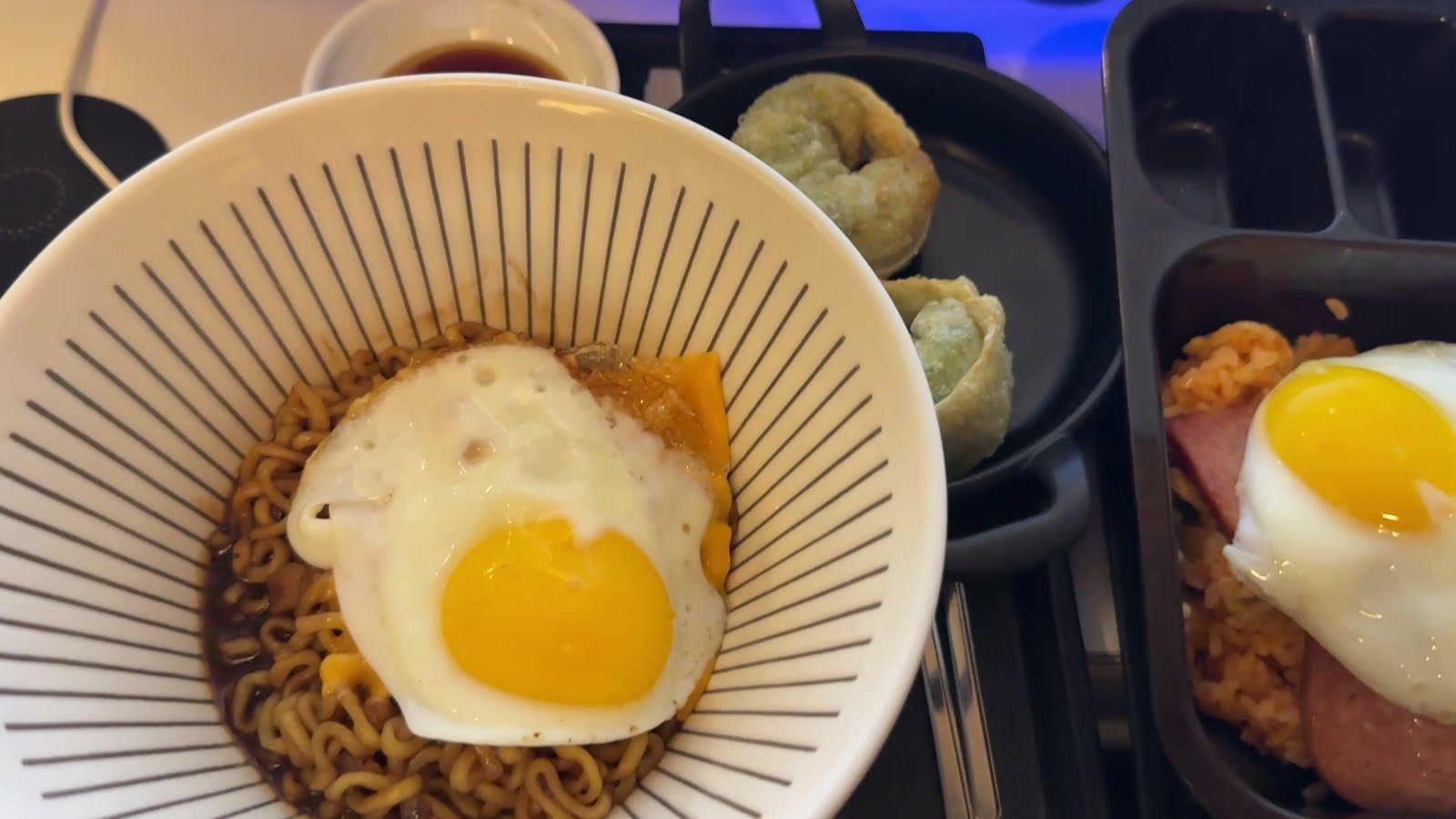
Food was a big part of my visit. I ordered Chapagetti, dumplings and kimchi fried rice with Spam, plus a Coke. Chapagetti is my usual PC bang choice; start with one dish if you want a snack-sized visit, then see how hungry you are.
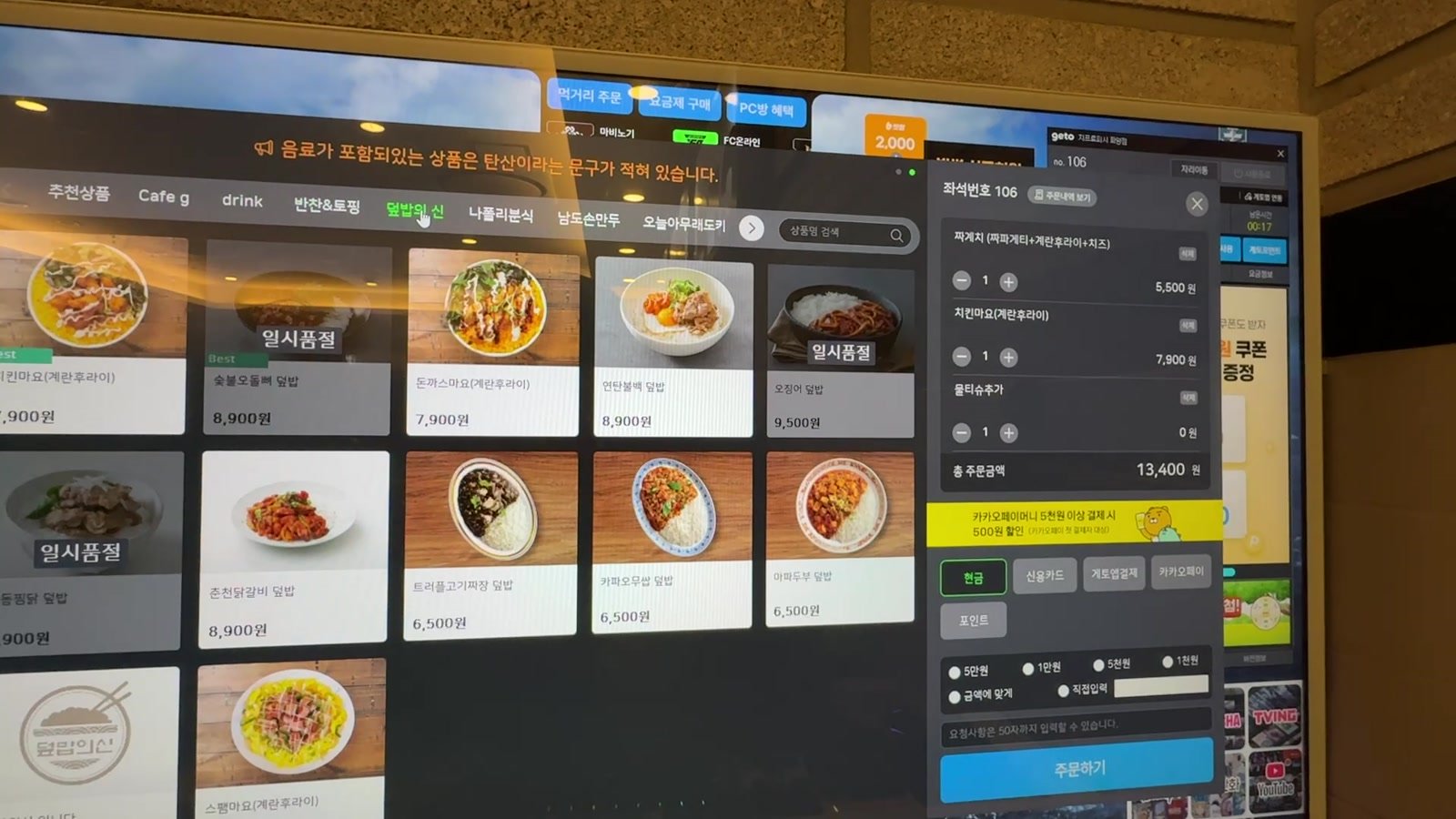
At my seat, 먹거리 주문 opened the food menu. Pictures made it easier to browse, and a cart appeared alongside the menu.
- Open the food-order menu and choose a dish.
- Check the item name, quantity, toppings and total. Remove anything you added by mistake.
- Check the seat number shown on the order.
- Select a payment option the café accepts, then use 주문하기 to place the order.
- Keep your payment method ready if staff say payment is taken when the food arrives.
The menu at my seat offered cash and card options. Be ready to pay when the food arrives if you choose that option; other systems take payment during ordering. Budget for food separately from your computer time.
Food from my PC bang visit.
For dietary restrictions, show staff the ingredient you need to avoid before ordering. A menu photograph cannot tell you everything in a sauce, broth or dumpling. Ask whether the kitchen is taking orders if you arrive late, and check before bringing outside food.
4. Watch your time, top up or finish
Find the café’s time panel as soon as your session starts. In my video it was at the top right of the screen. Look for 남은시간 (“time remaining”), rather than confusing it with elapsed time or the amount paid.
If the countdown seems shorter than expected, show staff your ticket and ask them to explain the rate for your seat and game. Before starting another match, leave enough time to finish it and sign out.
If you want longer, ask how to add credit to the same session before your time runs out. Staff can direct you to the extension option or kiosk used at that café. Check the remaining time again after a top-up.
Before leaving, follow this short checklist:
- Finish your game and save anything you need. Take your downloaded documents with you and remove personal files you left on the shared computer.
- Sign out of your game launcher, browser accounts and streaming services. Do not leave passwords saved on a shared computer.
- Use the café’s end-session control, or ask staff to close the session. Closing a game window alone is not the same thing.
- Confirm any outstanding computer or food bill, and ask where to return the tray.
If you have unused prepaid time, ask whether it can be reused, expires or is refundable. Keep the ticket until this is settled. Start with a small package if you are unsure how long you want to stay.
Make the first visit comfortable
Use headphones, keep voice chat at a considerate volume and ask before moving seats or changing equipment. A gaming room can be lively; it may not suit you if you want a quiet café for conversation. Check where bags can go without blocking an aisle, and ask about a seat away from a smoking-room entrance if that matters to you.
A phone translation app can help with a menu or an error message. Point it at the relevant text rather than other customers’ screens. Keep the phrases below available on your phone so you can show them to staff.
Useful Korean phrases at a PC bang
Pronunciation is approximate. You can also show staff the Korean text.
비회원으로 이용할 수 있어요?
bee-hweh-wuh-no-ro ee-yong-hal soo ee-ssuh-yo?
Can I use this as a non-member?
한 시간에 얼마예요?
han shee-ga-neh uhl-mah-yeh-yo?
How much is one hour?
해외 카드로 결제할 수 있어요?
heh-weh kah-deu-ro gyuhl-jjeh-hal soo ee-ssuh-yo?
Can I pay with a foreign card?
영어로 바꿔 주세요.
yuhng-uh-ro ba-kkwuh joo-seh-yo.
Please switch it to English.
출력할 수 있어요?
chool-lyuh-kal soo ee-ssuh-yo?
Can I print something?
로그인 좀 도와주세요.
lo-geu-in jom do-wa-joo-seh-yo.
Please help me log in.
이 게임 할 수 있어요?
ee geh-im hal soo ee-ssuh-yo?
Can I play this game?
음식은 어떻게 주문해요?
eum-shee-geun uh-ttuh-keh joo-moon-heh-yo?
How do I order food?
시간을 추가하고 싶어요.
shee-ga-neul choo-ga-ha-go shee-puh-yo.
I’d like to add more time.
이용 종료는 어떻게 해요?
ee-yong jong-nyo-neun uh-ttuh-keh heh-yo?
How do I end my session?
Watch my Seoul PC bang visit
Take a look inside, from buying computer time to ordering food at the desk. Use the full visit to get a feel for the room, kiosk and food before you go.
My 2025 visit. For the payment example, read the kiosk in won: ₩1,000 for 30 minutes, ₩2,000 for 60 minutes and ₩3,000 for 90 minutes. Use the current café’s rates when you visit.
Fit a PC bang into your Seoul day
Try a short visit near a neighbourhood you are already exploring. For a more deliberate break from outdoor sightseeing, leave room in your first five days in Seoul rather than squeezing it between distant stops.
If you would prefer a different kind of indoor activity, the National Museum of Korea guide offers a starting point for galleries and the museum shop. Choose it as a separate outing in Yongsan, with travel time from wherever you are staying.
Browse the Seoul travel guides for more ways to shape your day.
Want to try a PC bang on your trip?
Tell me your dates, hotel area and whether you are more interested in gaming, food or both. I can help you fit the visit into your Seoul plans.